A fix, not a blank page
Starter turtle lessons introduce commands with working examples. The optional ruin gives you a broken machine to repair, and the in-game Reference explains each machine’s commands.
Scriptlands teaches real Python, one piece at a time. Each piece is unlocked by crafting a chip, and each one makes a new kind of machine worth building, so there's always a reason to learn the next thing.
Starter turtle lessons introduce commands with working examples. The optional ruin gives you a broken machine to repair, and the in-game Reference explains each machine’s commands.
Every error names the line and says what to do: "grind isn't defined. Did you mean grind()?" Misspellings get a suggestion.
Step runs a script one line at a time and lights up each line, so you can see a loop go round.
The token bar and suggestions offer only the syntax you have. Locked words show crossed out, with the chip that opens them.
Each run has a number of operations to spend. Wasteful scripts run out, which makes loops, functions and events feel like real tools, not chores.
Every system has a no-code option first: a lever lights a lamp, a quarry has settings. Code is how you go further.
Every example below runs in the game as written.
A script is a list of commands that run in order. Each line calls one of the machine's functions, and some take a value in brackets: which side to pull from or push to.
## A Macerator's first script pull(BACK) grind() push(FRONT)
Give a value a name and use it later. Numbers, text, and the answers functions give back. A machine remembers its variables between runs, so it can keep count.
=print() to the machine's console# Text and numbers
left = energy()
print("energy left:", left)
half = left / 2
print("half of it:", half)Machines start making choices: send ore one way and coal another, burn fuel only when the battery is low. This is where sorting and fuel checks come from.
if, elif, else== < >and, or, not# A Diamond Pipe that sorts
item = pull()
if item.tag == "ore":
push(LEFT)
elif item.name == "coal":
push(FRONT)
else:
push(RIGHT)One run can repeat work. A turtle digs a whole tunnel; a quarry digs a whole pit. Turtle actions wait for each move, so the loop reads exactly like what happens in the world.
for with range()while, break, continue# A turtle clears a path
for step in range(5):
dig(FRONT)
move(FRONT)
turn(BACK)
stop()Name a behaviour once and use it again with different values. Functions keep their names to themselves and hand back a result with return.
def and parametersreturn valuesdef dig_row(length):
for i in range(length):
dig(FRONT)
move(FRONT)
return length
dug = dig_row(8)
print("dug", dug, "blocks")
stop()Hold many values at once: a recipe as rows of item names, or a dict of how many of each item to keep. The Programmable Crafter takes its recipes as lists.
[1, 2], items[0], append(){"coal": 3}, d["coal"]in, len(), sorted()# Keep a stock of a few items
wanted = {"torch": 16, "stick": 8}
for name in wanted:
if count(name) < wanted[name]:
craft(recipe(name))Machines on a data cable can talk. A script with handlers sets itself up once, then runs only when something happens: a message, an item arriving, a job done, power running low.
@on("message") handlerssend(), broadcast(), receive()message, tick, item_in, done, power_lowset_name("boss")
send("boiler", "pause")set_name("boiler")
@on("message")
def heard(msg):
print(msg.sender, "says", msg.data)
The top of the language. Make your own kinds of thing with their own values and methods. A class built on Bot becomes robot firmware: deploy() sends it to every robot with that name.
class, self, __init__class Harvester(Bot):
def __init__(self):
self.dug = 0
def tick(self):
if self.dug < 6:
self.dig(FRONT)
self.move(FRONT)
self.dug += 1
sent = deploy(Harvester, "miner")
print("deployed to", sent, "robots")
Scripts are a subset of Python 3, run by the game's own interpreter. What you learn carries straight over to Python on a computer. The differences are small and deliberate:
import. Machines share code by deploying classes.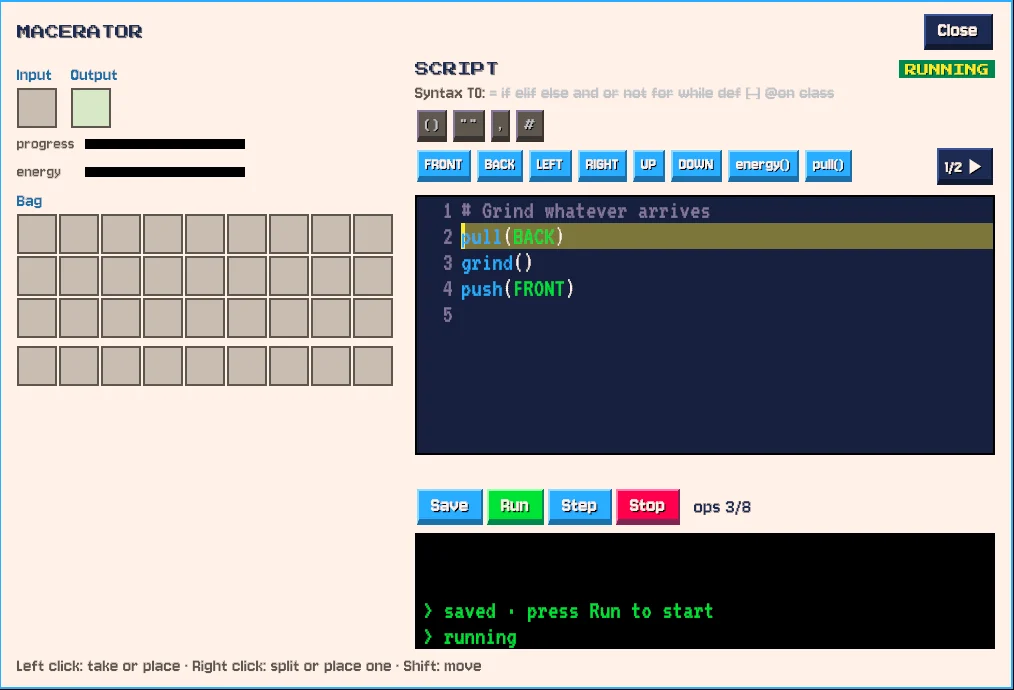
Scriptlands is designed for players 12 and up who have never programmed, without talking down to players who have.
The core of an introductory programming course, in order: functions, variables, conditions, loops, writing functions, lists and dicts, events, and classes. Each is introduced when a machine needs it.
No accounts, no chat with strangers unless a player hosts or joins a world, and no internet needed to play. Scripts can only control machines inside the game.
Students can play on one hosted world over the school network. A classroom mode, where a teacher chooses which tiers are open, is planned. Lesson plans and worksheets will be posted here.